
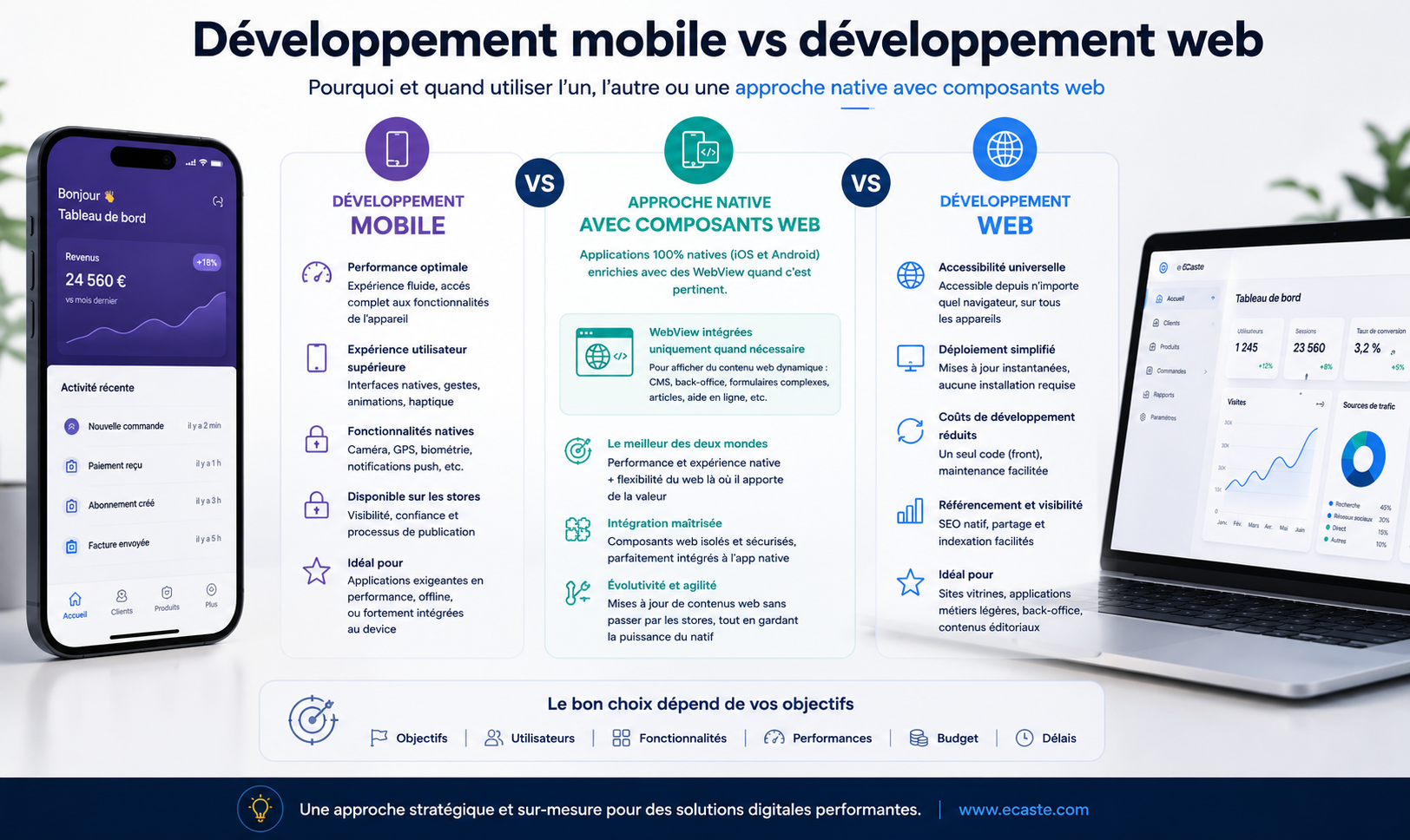
"We're told we need a mobile app, but is that really necessary?"
That's the question we hear regularly at ECASTE. And we have an honest answer: not always. In reality, many SMBs invest in a mobile app when a responsive web app would have better met their needs — and cost 40% less to develop and maintain.
But the reverse is also true: some SMBs think the web is enough, when a native mobile app would quickly become essential for their field teams.
So the right question isn't "web app or mobile app?" but rather: "Where are my users really, and how do they actually work?"
After 16 years of application development — web and native mobile combined — we've learned to recommend the right solution for each context. Not the most expensive, not the most complex. The most appropriate.
When to choose a web app?
Internal team or remote workers
You have 8 employees split between office and remote work. They need to access an order management system, review reports, centralize customer data. Where do they work? On a desktop, laptop, sometimes a tablet.
This is the perfect scenario for a web app.
Why? Because a web app offers:
- No installation or updates: deploying a new version means simply updating the server. All users get access immediately. With a mobile app, you go through the App Store or Google Play and wait for users to download.
- Multi-platform accessibility: Windows, Mac, Linux — doesn't matter. Code runs everywhere without modification.
- Centralized maintenance: one application to maintain, one database, one infrastructure. No syncing between iOS and Android versions.
- Lower costs: developing a web app costs about 30-40% less than a native mobile app.
Real example: IziTrack, the B2B management software we developed for LDLC Nice Grimaldi, is a web app. The sales team accesses it from the office and from home.
Need for SEO and organic visibility
You're launching a platform or SaaS tool meant to attract customers organically. You dream of Google rankings, free traffic.
A web app is your best ally.
Why? Because Google indexes web pages, not mobile apps. A prospect searching "inventory management software for SMBs" will find your website in results, not your app on the App Store.
A well-designed web app can generate thousands of free monthly visits. A native mobile app? It stays invisible to Google.
Multiple users across multiple devices
You're targeting both desktop users, occasional mobile users, and maybe tablet users.
A responsive web app reaches all these profiles with a single application. Automatically adapts to any screen. Zero extra development costs.
When to choose a native mobile app?
Field team without stable internet
You have a team spending their day out of the office: insurance agents, plumbers, electricians, site inspectors, sales reps.
These people don't have stable internet. They need to access data without connection (offline), then sync when connection returns.
This is when to think native mobile app.
Why? Because a native app can:
- Store data locally on the phone
- Work completely offline
- Auto-sync when connection returns
- Do all this smoothly and performantly
Offline web apps exist, but they're far less smooth and require rare technical expertise.
Real example: a plumber receives an order on his phone, accesses customer info (history, intervention type), takes photos of the installation, records notes — all offline. When he gets WiFi, everything syncs to the server.
Push notifications and real-time engagement
You need users to receive instant alerts: urgent order notifications, new message alerts, emergency situations.
Native push notifications — those appearing on the lock screen — are powerful. They grab attention far better than web notifications.
A native mobile app handles this natively. A web app can send notifications, but users must have the browser open.
Advanced hardware access
You need to integrate advanced phone features:
- Advanced photo camera
- Barcode or QR code reader
- Precise geolocation
- Bluetooth for external equipment
- NFC for reading chips
This requires a native mobile app. Swift (iOS) and Kotlin (Android) shine here.
Real example: a site visit app with geolocated photos, or a quality control app with barcode capture.
Hybrid solutions: when to build web AND mobile
The winning pattern: web backoffice + mobile field
Here's a common scenario:
- Admin team (office) managing orders, clients, reports → web app
- Sales or tech team (field) taking orders, checking client info, taking photos → native mobile app
Both apps share the same database and sync in real-time.
When it's cost-effective
A second app has a cost. Before launching, ask yourself: "Is there really a field team needing a mobile app?"
If the team spends 50%+ of time out of office, needs offline data access, or would benefit from push notifications — then it's worth it.
If it's "maybe, for the future," it's not yet time. Start with the web app. Add mobile later if needed.
Quick decision matrix
Before launching, ask yourself these questions:
| Criterion | Web ✓ | Mobile ✓ |
|---|---|---|
| Users mostly work in office or remote (computer) | ✓ | |
| Users in field without stable connection | ✓ | |
| Need for SEO / organic traffic | ✓ | |
| Permanent team on mobile | ✓ | |
| Need for critical push notifications | ✓ | |
| Hardware access (camera, GPS, Bluetooth, sensors) | ✓ | |
| Simple deployment and maintenance | ✓ | |
| Limited budget (quick MVP) | ✓ |
Read it this way: multiple checkmarks in "Web" = go web. Multiple in "Mobile" = go mobile. Balanced = you might need both.
What we recommend at ECASTE
At ECASTE, we have expertise in both web apps and native mobile apps (iOS with Swift, Android with Kotlin). What matters to us is recommending the right solution for your context.
An in-person audit of your real situation
We don't recommend technology upfront. We come observe how you really work: where are your users, how do they access information, what slows them down, what are the real needs?
An honest recommendation
If you thought you needed a mobile app and our diagnosis shows a responsive web app would suffice, we'll tell you. Why? Because it's better for you: cheaper to develop, cheaper to maintain.
Conversely, if you thought web but the context requires mobile, we'll say that too.
An iterative approach
We don't force you to choose perfectly on day one. Start with a web app for backoffice, see results, then add a mobile app only if truly needed. Faster, less risky, better budget control.
Technologies that last
Whether web (Vue.js, Node.js) or native mobile (Swift, Kotlin), we pick proven, maintained technologies. No trend frameworks. Solid expertise.
Conclusion
Web or mobile? The answer doesn't exist in the abstract. It depends on your context: where do your users really work, what are their real constraints, what's your budget, what's your timeline?
At ECASTE, we've guided dozens of SMBs through this decision. And every time, honesty pays: recommending the right solution is the best way to build trust and deliver a product that actually works.
Hesitating between web and mobile for your project? Contact us for a personalized diagnosis. We come to you, observe, ask the right questions, and recommend what truly fits.